
ChatGPT has become a go-to tool for writing, research, coding, and everyday questions. But one question keeps coming up again and again: can ChatGPT browse the web?
Some users say it can pull live news. Others say it only knows old information. Both are partly right, which is why there is so much confusion.
In this guide, we will break it all down in plain English. You will learn when ChatGPT has internet access, how its browsing feature works, whether it uses real-time data, and what its limits are. By the end, you will know exactly when you can trust ChatGPT for current information and when you should double-check elsewhere.
Quick Answer: Can ChatGPT Browse the Web Right Now?
Yes, ChatGPT can browse the web, but not all the time and not for everyone.
Here is the short version:
- ChatGPT only browses the internet when its browsing feature is turned on
- Internet access depends on the version and plan you are using
- When browsing is off, ChatGPT relies only on its training data
So ChatGPT does not always use live data by default. Browsing is a feature, not a constant background activity.
Does ChatGPT Use Real-Time Data?
This is where most misunderstandings start.
By default, ChatGPT does not use real-time data. Instead, it is trained on a massive collection of books, articles, websites, and other texts before a certain cutoff date.
That means:
- It does not automatically know today’s news
- It does not see live stock prices
- It does not track breaking events unless browsing is enabled
When people ask, “does ChatGPT use real-time data?” the honest answer is: only when the browsing feature is active.
Without browsing, ChatGPT is like a very smart offline encyclopedia. With browsing turned on, it can temporarily look things up online and respond using current information.
How ChatGPT Internet Access Actually Works
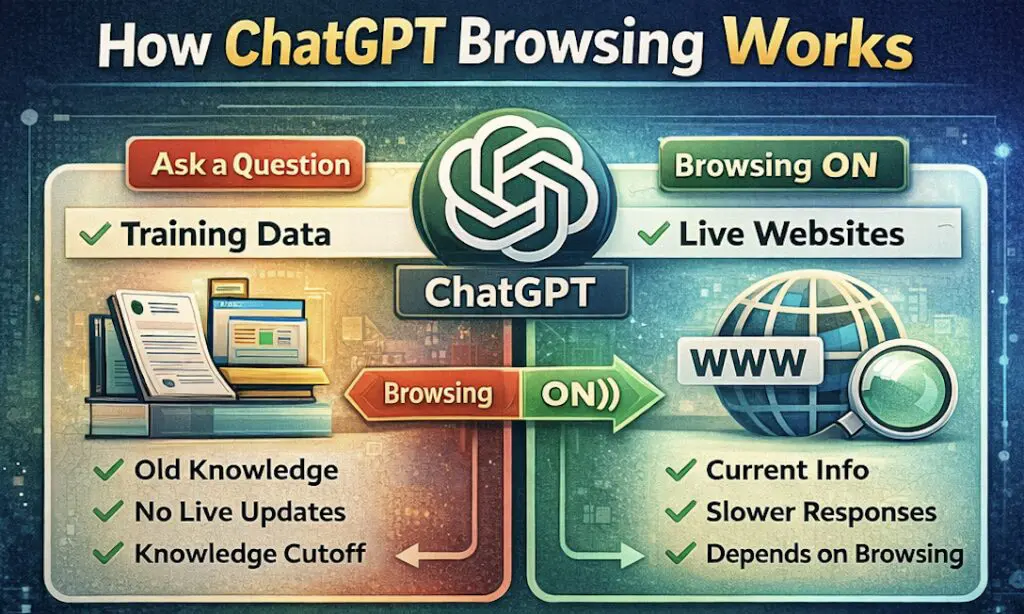
Built-In Knowledge vs Internet Browsing
ChatGPT has two very different ways of answering questions.
First, there is its built-in knowledge. This comes from training on huge amounts of text. It is fast, but it can be outdated.
Second, there is ChatGPT’s internet access, which allows it to search the web in real time. This is slower, but it can provide up-to-date answers.
The key thing to remember is that ChatGPT only browses when it needs to and when the feature is available to you.
What ChatGPT Can and Cannot Browse
When browsing is enabled, ChatGPT can:
- Read public websites
- Check news articles
- Look up factual information
- Summarize online content
However, it cannot:
- Access private accounts or logins
- Read paywalled content reliably
- Browse social media feeds behind logins
- See personal or confidential data
Browsing is limited to publicly accessible information.
Which ChatGPT Models Can Access the Internet?
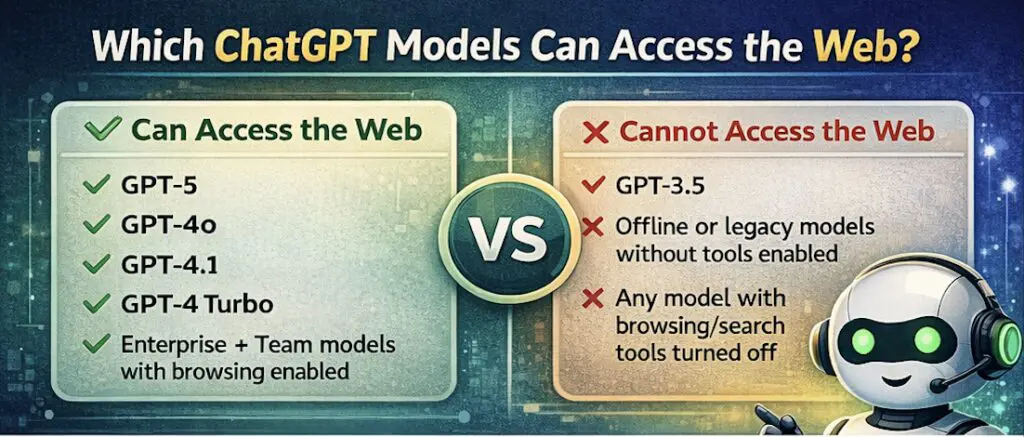
These models can browse the internet and use live data when the browsing or search tool is enabled:
- GPT-5 (all variants, including main, thinking, and mini)
- GPT-4o
- GPT-4.1
- GPT-4 (tool-enabled versions)
- GPT-4 Turbo
- Enterprise and Team models with browsing enabled
- Custom GPTs that have web browsing tools turned on
ChatGPT Browsing Feature Explained
Who Can Use the ChatGPT Browsing Feature?
Access to browsing depends on your ChatGPT plan.
In general:
- Free users often have limited or no browsing access
- Paid plans like Plus, Team, or Enterprise are more likely to include browsing
- Availability can change as features are tested and updated
Because OpenAI frequently updates ChatGPT, browsing access may vary over time.
How Browsing Works Inside ChatGPT
When browsing is enabled, ChatGPT can search the web, read selected pages, and then write a response based on what it finds.
You will usually notice that:
- Responses take slightly longer
- ChatGPT may mention sources
- Answers are more current
This is what people mean when they talk about the ChatGPT browsing feature.
What Can ChatGPT Do With Live Data?
When ChatGPT has access to live data, it becomes much more useful for time-sensitive tasks.
Some common examples include:
- Summarizing recent news stories
- Checking current product prices
- Researching recent trends or events
- Verifying facts that change over time
- Comparing up-to-date information from multiple sources
This is where ChatGPT live data really shines. It bridges the gap between a language model and a search engine, although it is not meant to replace search entirely.
Limitations of ChatGPT Browsing the Web
Even with browsing turned on, ChatGPT has important limits you should understand.
Accuracy and Source Quality
ChatGPT does not judge truth the way humans do. If a webpage is misleading or incorrect, ChatGPT may repeat that information.
This is why it is always smart to:
- Check original sources
- Be cautious with sensitive topics
- Avoid relying on a single answer
Speed and Availability
Browsing responses take longer than offline answers. Sometimes browsing may be unavailable due to system limits or regional restrictions.
AI Detection and Content Reliability
Because ChatGPT can browse the web and generate content quickly, many users wonder whether AI detectors can identify its output.
AI detectors like Originality.ai try to guess whether text was written by a human or an AI model. However, they are not always accurate. Browsing the web or using live data does not make ChatGPT’s content easier or harder to detect. Detection depends more on writing patterns than on whether the information is current.
Privacy and Security
ChatGPT does not browse the web continuously or track you online. Browsing happens only within the conversation and only to answer your question.
Still, you should avoid sharing personal or sensitive information when asking it to look things up.
ChatGPT vs Other AI Tools With Internet Access
ChatGPT vs Google Gemini
Google Gemini is deeply integrated with Google Search, which can be useful for fast lookups. ChatGPT, on the other hand, focuses more on explanations, summaries, and structured answers.
ChatGPT vs Bing Copilot
Bing Copilot is closely tied to Microsoft’s search engine and often provides direct citations. ChatGPT tends to offer cleaner, more conversational responses, especially for complex questions.
ChatGPT vs Perplexity AI
Perplexity is designed specifically for live research and citations. ChatGPT is more flexible and creative but may require extra verification for research-heavy tasks.
Each tool has strengths. ChatGPT works best when you want clear explanations, not just links.
When You Should Use ChatGPT for Web Browsing
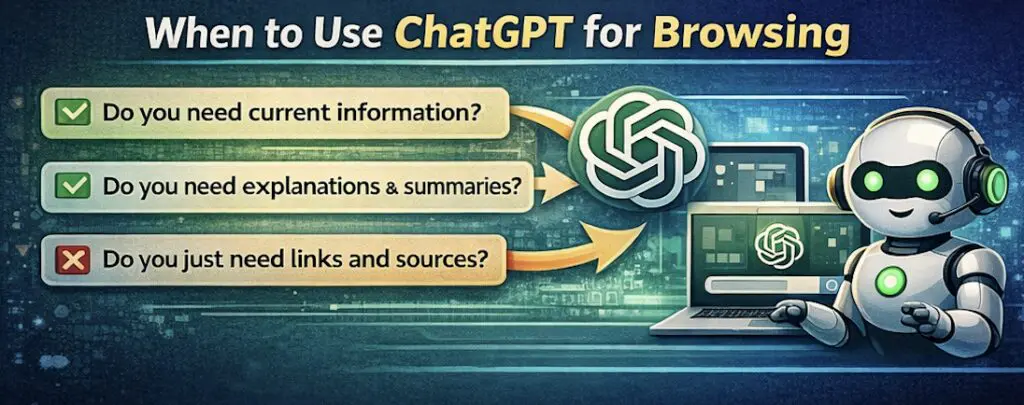
ChatGPT is a great choice when you want:
- Quick summaries of current topics
- Clear explanations of recent events
- Help comparing information from multiple sources
- Context, not just raw search results
Traditional search engines are still better for deep research, shopping comparisons, or highly technical queries. Many people get the best results by using both together.
Final Verdict: Can ChatGPT Browse the Web and Is It Worth Using?
So, can ChatGPT browse the web? Yes, but only under specific conditions.
ChatGPT does not constantly scan the internet or pull live data by default. When its browsing feature is available and enabled, it can access current information and provide up-to-date answers. When it is not, it relies on its existing knowledge.
The key is knowing which mode you are using.
If you understand its limits and strengths, ChatGPT can be an incredibly powerful tool for learning, research, and everyday problem solving. Used wisely, it complements search engines rather than replacing them.
Frequently Asked Questions
Can ChatGPT browse the web for free?
Sometimes, but not always. Free access to browsing depends on current feature availability and testing. Paid plans are more reliable.
Is ChatGPT always using live data?
No. ChatGPT only uses live data when browsing is enabled. Otherwise, it relies on its training data.
Can ChatGPT browse social media or private sites?
No. It cannot log into accounts or access private content.
How accurate is ChatGPT when browsing the web?
It can be accurate, but it depends on the sources it finds. Always double-check important information.
Does ChatGPT need internet access to generate images?
No. ChatGPT can generate images without browsing the web. AI image generation uses trained visual models, not live internet data. Web browsing can help with research or inspiration, but it is not required to create images.