
WordPress still powers roughly 43% of websites across the internet, but market dominance doesn’t automatically mean it’s the right choice for your next project. The platform that revolutionized web publishing two decades ago now carries significant friction points that modern alternatives have solved more elegantly.
Many businesses now question whether managing hosting, updates, plugins, and security is worth the flexibility WordPress provides. For non-technical teams, those responsibilities often slow down publishing, introduce risk, and increase long-term costs.
This guide explores the most relevant WordPress alternatives in 2026, organized by platform category rather than popularity. Instead of listing tools without context, it explains when each type of platform makes sense and which options perform best for specific use cases.
Quick Picks: Best WordPress Alternatives in 2026
- Best for marketing sites: Webflow
- Best for small business: Wix Studio
- Best for portfolios and content: Squarespace
- Best for ecommerce: Shopify
- Best headless CMS: Sanity or Contentful
- Best open-source publishing: Ghost
What Counts as a WordPress Alternative in 2026
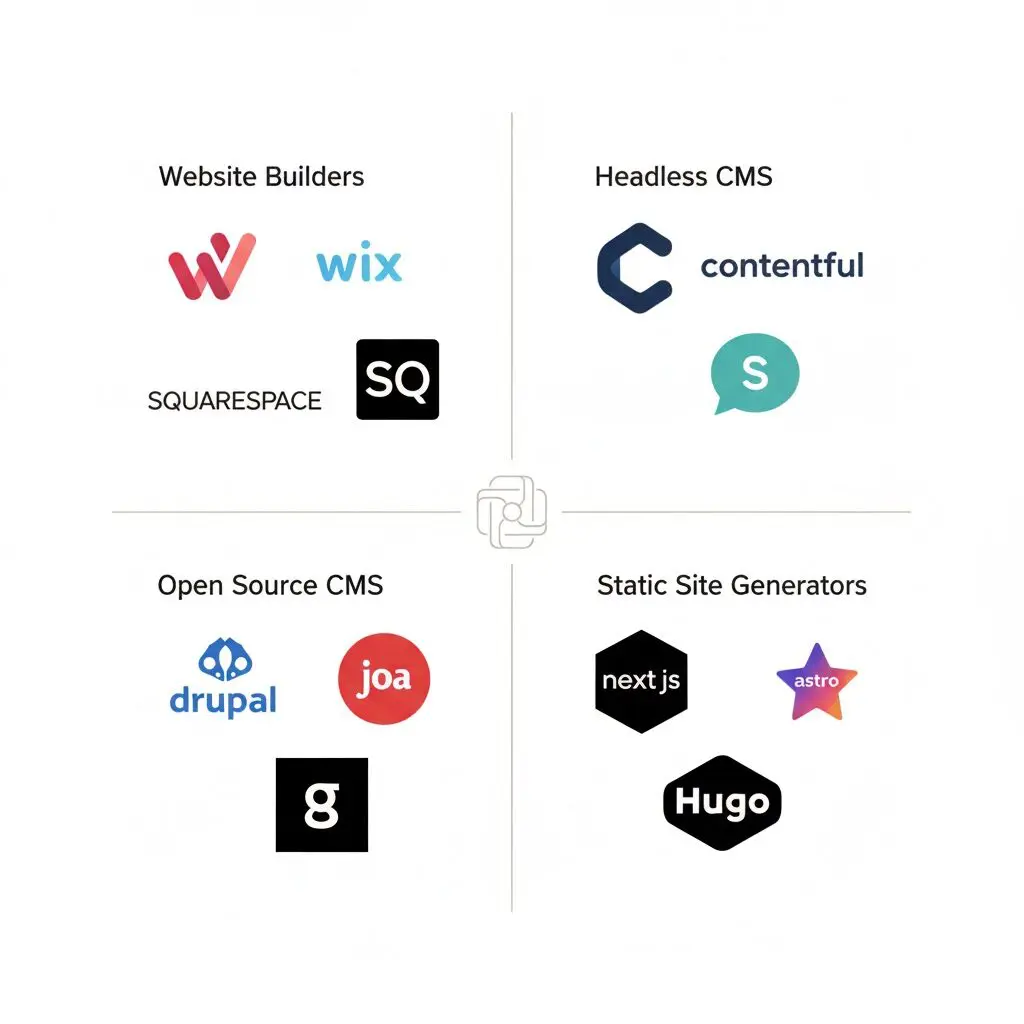
WordPress alternatives now fall into 4 distinct categories, each solving different problems:
- No-code website builders prioritize ease and speed. Platforms like Webflow, Wix, and Squarespace offer visual editors that generate production-ready sites without coding. Hosting, security, and maintenance come bundled into predictable monthly fees.
- Headless CMS platforms provide flexibility and scale for complex content operations. Systems like Contentful and Sanity deliver content via APIs to any frontend, enabling websites, mobile apps, and custom digital experiences from a single content repository.
- Open-source CMS alternatives offer control and extensibility similar to WordPress but with different architectures. Options like Drupal, Joomla, and Ghost give you complete ownership while solving specific pain points WordPress struggles with.
- Static site generators maximize performance and security. Tools like Next.js, Astro, and Hugo compile websites into static files that load instantly and present minimal attack surfaces. The trade-off requires developer involvement but delivers unmatched speed.
Choosing the right category is often more important than choosing a specific tool. Each category solves different problems and comes with different tradeoffs.
Website Builders vs WordPress: What Is Actually Different
This quick comparison explains website builders vs WordPress across hosting, maintenance, SEO workload, and cost.
Factor | Website Builders | WordPress |
Hosting | Included | Separate required |
Maintenance | Automatic | Manual |
Security | Platform-managed | Self-managed |
Customization | Visual editor | Code + plugins |
Setup Time | Hours | Days to weeks |
Monthly Cost | $15-$50 (all-in) | $5-$50+ hosting + plugins |
Technical Skills | None needed | Basic to advanced |
Updates | Automatic | Manual |
Why Choose Website Builders
Website builders excel when speed to launch matters more than endless flexibility. A marketing team can build and publish landing pages in hours rather than days. Total cost of ownership stays predictable without surprise plugin fees or developer invoices. Non-technical team members manage content independently without breaking things accidentally.
Why Choose WordPress
WordPress maintains advantages for highly customized backend logic that visual builders can’t accommodate. Sites built around complex plugin ecosystems for membership systems, custom booking workflows, or specialized integrations may require WordPress’s extensibility. The platform’s maturity means solutions exist for nearly any niche requirement.
No-Code Website Builders: Best WordPress Alternatives for Non-Technical Teams
No-code website builders have matured significantly, now offering capabilities that previously required custom development. The platforms below were evaluated based on design flexibility, ease of use, performance benchmarks, SEO capabilities, pricing transparency, and migration pathways from WordPress.
Testing involved building comparable sites across each platform to assess real-world workflow efficiency, examining how non-technical users handle common tasks like content updates and layout changes, and measuring Core Web Vitals scores under typical traffic conditions. The selection focuses on platforms that genuinely solve WordPress pain points rather than simply replicating its approach with a different interface.
Webflow: Best for Design-Driven Brands and Marketing Teams
Webflow is a visual website builder that combines advanced design control with an integrated CMS and managed hosting. It removes much of the technical overhead associated with WordPress while offering more layout flexibility than traditional drag-and-drop builders. This makes it a strong alternative for teams that want custom design without relying on plugins or custom development.
Key features
- Visual editor with precise layout and styling control
- Built-in CMS for structured content
- Managed hosting with performance optimization
- Native SEO settings and clean code output
Best for
Design-focused brands, marketing teams, and agencies building scalable marketing websites.
Pricing snapshot
Free plan available for basic sites; site plans from $14/month; CMS plans from $23/month for dynamic content and higher page limits
Migration ease
Medium. Content requires manual migration or CSV import; designs need complete rebuilding, but the design flexibility makes the effort worthwhile for brands prioritizing visual differentiation.
Consider if
The team is willing to invest time in learning a more advanced editor.
Wix Studio: Best All-Around WordPress Alternative for Small Businesses
Wix Studio is the more advanced evolution of the Wix ecosystem, offering greater design flexibility while maintaining ease of use. It replaces many WordPress plugins with built-in features, including SEO tools, analytics, and performance optimization. For many businesses, it offers a simpler path to a professional website without technical maintenance.
Key features
- Visual drag-and-drop editor with advanced layout options
- AI-assisted site setup and content tools
- Large app marketplace
- Fully managed hosting and security
Best for
Small businesses, service providers, and teams without technical resources.
Pricing snapshot
Free plan with Wix branding; premium plans from $17/month including free domain for one year, removal of Wix ads, and increased storage and bandwidth
Migration ease
High. WordPress content import tools make migration straightforward; Wix’s support team offers migration assistance for business plans and above.
Consider if
Long-term platform lock-in is a concern.
Squarespace: Best for Content and Brand-First Websites
Squarespace focuses on design consistency and simplicity. It provides polished templates, integrated blogging, and reliable performance without configuration. Compared to WordPress, it reduces complexity significantly but offers fewer customization options.
Key features
- High-quality templates with responsive design
- Built-in blogging and analytics
- Integrated hosting and security
- Simple content management
Best for
Creators, consultants, portfolios, and content-focused small businesses.
Pricing snapshot
Personal plan from $16/month, Business plan from $23/month, e-commerce plans from $27/month with transaction fee removal and advanced features
Migration
Medium. WordPress import tool handles basic content; images and formatting require review and adjustment to match Squarespace’s design system.
Consider if
Advanced integrations or custom functionality are required.
Shopify: Best WordPress Alternative for E-commerce
Shopify is purpose-built for online selling and removes much of the complexity associated with WooCommerce. It handles hosting, payments, inventory, and scalability out of the box. While it is less flexible for content-heavy sites, it outperforms WordPress for most ecommerce use cases.
Key features
- Complete ecommerce infrastructure
- Built-in payment processing
- Inventory and order management
- Scalable hosting and security
Best for
Online stores, subscription businesses, and direct-to-consumer brands.
Pricing snapshot
Basic plan from $39/month, Shopify plan at $105/month, Advanced plan at $399/month; transaction fees of 0.5% to 2% waived when using Shopify Payments
Migration
High. Dedicated WordPress and WooCommerce migration apps transfer products, customers, and orders; Shopify’s migration specialists assist on higher-tier plans.
Consider if
The primary goal is content publishing rather than selling products.
Best Headless CMS Alternatives to WordPress
What Is a Headless CMS?
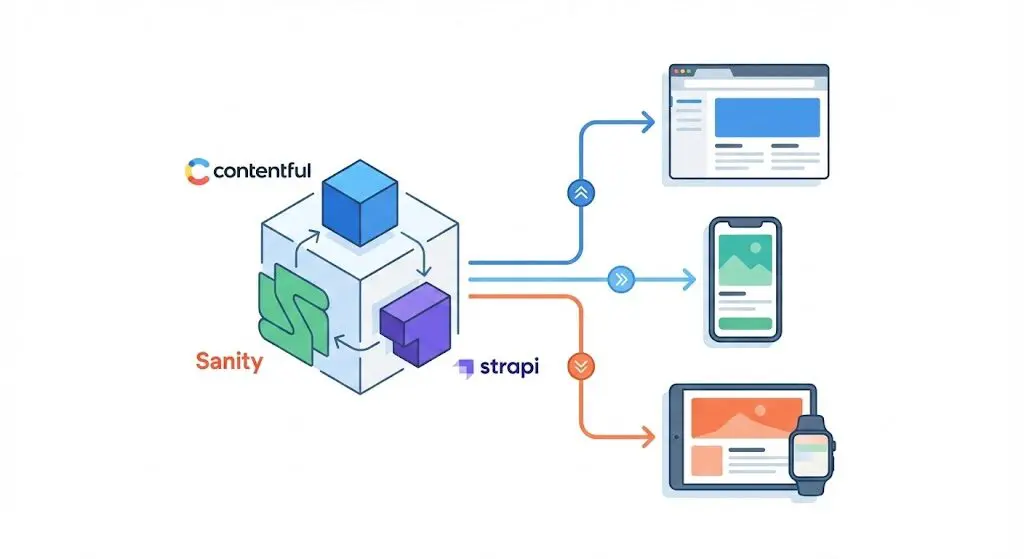
A headless CMS decouples content management from content presentation by separating the backend content repository from the frontend display layer. Unlike traditional CMS platforms that bundle content editing and website rendering together, headless systems store and manage content in a structured database, then deliver it via APIs to any frontend application.
This architecture enables publishing the same content across websites, mobile apps, digital signage, voice assistants, and any other platform consuming APIs. Content teams work in a central editing interface while developers build custom frontends using modern frameworks like React, Next.js, or Vue without constraints from the CMS’s presentation layer.
Top Headless CMS Alternatives to WordPress
Sanity offers real-time collaboration and structured content modeling with a developer-friendly editing experience. The platform excels at complex content relationships and custom editing interfaces tailored to specific content types. Multiple team members can edit simultaneously with changes appearing instantly across sessions.
Contentful provides enterprise-grade content operations with robust workflow management, localization for international publishing, and extensive API capabilities. Large organizations choose Contentful for its scalability, compliance certifications, and mature ecosystem of integrations and developer tools.
Strapi delivers open-source flexibility with self-hosting options for teams wanting control over infrastructure. The platform offers a visual content-type builder, role-based access control, and plugin extensibility without vendor lock-in. Teams can customize Strapi extensively or host it wherever compliance requirements dictate.
Best For:
Headless CMS platforms suit SaaS products needing content management for documentation, help centers, and marketing pages without building custom CMS interfaces. Businesses publishing across multiple channels benefit from maintaining single content sources feeding websites, mobile apps, and other digital experiences. Development teams building custom frontends with React, Next.js, or other modern frameworks gain content management capabilities without CMS constraints on frontend architecture.
Best Open-Source CMS Alternatives to WordPress
Open-source CMS platforms offer flexibility without relying on the WordPress ecosystem. These tools often require more technical expertise but provide greater control over data and infrastructure.
Drupal
Drupal handles enterprise workflows and complex content architectures that simpler CMS platforms struggle with. The platform offers robust taxonomy systems, granular permissions, workflow management, and extensive customization through modules. Government agencies, universities, and large corporations choose Drupal for compliance capabilities and proven scalability. The complexity demands developer expertise and longer implementation timelines.
Joomla
Joomla provides flexibility between WordPress and Drupal with built-in features like multilingual support, user management, and content versioning without plugins. The platform suits mid-sized organizations needing more structure than WordPress offers without Drupal’s complexity. However, the interface feels dated compared to modern alternatives, and the developer community has shrunk relative to WordPress.
Ghost
Ghost takes a modern approach focused specifically on publishing and memberships. The platform offers a clean, distraction-free writing interface, built-in membership and subscription capabilities, native newsletter integration replacing services like Mailchimp, and excellent performance with static site generation. Ghost appeals to professional publishers, journalists, and content creators prioritizing writing experience and reader engagement over general-purpose functionality.
Choose an Open-Source CMS If You Need:
Full infrastructure control for hosting on your own servers or compliant cloud providers. Custom data models and content structures that don’t fit template-based builders. Specific compliance or security governance requirements that demand complete platform control. Reduced plugin dependencies that cause WordPress sites to slow down or break with updates.
Static Site Generators: The Fastest WordPress Competitors
Static site generators produce pre-built pages that load extremely fast and reduce security risks. Popular options include Next.js, Astro, and Hugo.
Static site generators deliver extreme performance by pre-rendering pages at build time rather than generating them for each visitor request. Pages load instantly since servers only transmit HTML, CSS, and minimal JavaScript rather than querying databases and executing PHP for every page view.
Security improves dramatically with minimal attack surfaces. No database means no SQL injection vulnerabilities. No server-side code execution means no remote code execution exploits. Static sites simply serve files with nothing to hack beyond the hosting infrastructure itself.
Hosting costs drop to nearly nothing since static files require minimal server resources. Services like Netlify, Vercel, and Cloudflare Pages offer free hosting for most static sites with automatic SSL, global CDN, and continuous deployment.
Best CMS Alternatives to WordPress for Your Use Case
Choose a Website Builder If:
You prioritize speed to launch over endless customization options. Marketing teams need autonomy publishing landing pages, blog posts, and content without developer dependencies. You want predictable monthly costs without surprise plugin fees or developer invoices for maintenance. Your team lacks technical resources for managing hosting, security, and performance optimization. The 80% solution solves your needs, making the missing 20% an acceptable trade-off for simplicity.
Choose Headless CMS If:
You publish content across multiple channels simultaneously: website, mobile app, digital signage, voice assistants, and other digital experiences. Developer resources are available to build and maintain custom frontend applications. You need structured content with complex relationships and governance workflows. Omnichannel consistency matters more than launch speed. Your organization requires API-first architecture for integrating with other systems.
Choose Open-Source CMS If:
Complete infrastructure control matters more than convenience and managed services. You manage technical teams comfortable with server administration, security hardening, and performance tuning. Specific compliance requirements dictate exactly where and how data gets stored. Custom data models and workflows don’t fit template-based platforms. Reducing plugin dependencies from WordPress sounds appealing while maintaining self-hosted flexibility.
Choose Static Site Generator If:
Performance is non-negotiable and you need the fastest possible page loads. Development teams work comfortably with Git workflows, build processes, and modern JavaScript frameworks. Security and minimal attack surfaces justify the development effort. Hosting costs matter and nearly-free static hosting fits your budget model. Content updates happen through code commits rather than CMS interfaces, matching developer workflows.
The right choice depends on balancing team capabilities, project requirements, and acceptable trade-offs rather than identifying a universally “best” platform.
Final Verdict: WordPress Is No Longer the Default
WordPress is not obsolete, but it is no longer the automatic choice it once was. Website builders, headless CMS platforms, and modern open-source tools now outperform WordPress in specific scenarios.
The best website platforms in 2026 are those that reduce friction, align with team capabilities, and support long-term growth. Choosing intentionally is more effective than relying on familiarity.
Need help choosing the right platform or migrating from WordPress? Buzzcube specializes in web design and development across all major platforms. Our team helps businesses select the optimal solution for their goals and handles the technical complexity of migration, ensuring zero downtime and preserved SEO rankings.
Get a free consultation to discuss your project.
Frequently Asked Questions
Is WordPress still worth using in 2026?
WordPress is still a viable option for websites that require deep customization, custom plugins, or full control over hosting and infrastructure. However, many modern businesses find that managed website builders and headless CMS platforms reduce maintenance, improve performance, and lower long-term costs. The right choice depends on technical resources and project complexity.
What is the easiest WordPress alternative for beginners?
For beginners, Wix and Squarespace are generally the easiest WordPress alternatives to use. Both platforms include hosting, security, and updates by default, which removes much of the technical responsibility associated with WordPress. Their visual editors allow users to build and manage websites without coding knowledge.
Are no-code website builders bad for SEO?
Modern no-code website builders are not inherently bad for SEO. Most provide essential SEO features such as custom meta tags, clean URLs, mobile optimization, and fast hosting. Search performance depends more on content quality, site structure, and proper configuration than on the platform itself.
Which WordPress alternative scales best?
For large or scalable websites, headless CMS platforms and purpose-built solutions like Shopify often perform better than WordPress. These platforms handle high traffic, structured content, and complex workflows more reliably. They are especially suitable for businesses with growing content needs or ecommerce operations.
Can a site be migrated without losing rankings?
A WordPress site can be migrated without losing SEO rankings if the process is handled correctly. Key steps include maintaining URL structures where possible, setting up proper 301 redirects, preserving metadata, and resubmitting sitemaps. Most SEO issues during migration come from missing redirects or lost content rather than the platform change itself.
Which WordPress alternative is best for ecommerce websites?
Shopify is widely considered the best WordPress alternative for ecommerce websites. It offers built-in payment processing, inventory management, and scalable hosting without relying on plugins. Compared to WooCommerce, Shopify typically requires less setup and ongoing maintenance for online stores.